A fast and reliable internet connection is more than just a convenience it’s a necessity. Whether you’re streaming your favorite shows, attending virtual meetings, gaming online, or simply browsing the web, slow internet can be incredibly frustrating and disruptive.
The speed of your internet is influenced by a combination of factors, including your hardware, service provider, network congestion, and even your online habits. Understanding these factors and implementing practical solutions can make a noticeable difference in your online experience.
Optimize Router Placement
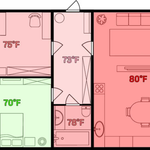
Router placement directly affects signal strength. Place routers in central locations without walls or obstructions. Avoid placing routers near microwaves or cordless phones that cause interference. Elevating the router improves coverage, ensuring devices receive strong signals throughout the home.
Use Wired Connections
Wi-Fi is convenient, but wired connections provide stable speeds. Ethernet cables connect devices directly to the router, reducing lag, interruptions, and packet loss. For gaming and streaming, wired connections deliver consistent performance.
Upgrade Hardware
Old routers and modems limit speed. Modern routers support faster speeds, wider coverage, and multiple devices. Check for devices supporting Wi-Fi 6 or latest standards for optimal performance. Similarly, ensure your device network cards and firmware are updated.
Limit Background Applications
Many applications consume bandwidth without notice. Streaming apps, cloud backups, or software updates running in the background reduce internet speed. Close unnecessary applications to prioritize important tasks and increase performance.
Use Quality of Service (QoS) Settings
QoS settings prioritize traffic for critical applications. Streaming, video calls, and gaming can receive priority over downloads. Configuring QoS on modern routers ensures high-performance for essential activities.
Manage Connected Devices
Too many devices connected to the network slow performance. Limit connections or schedule high-bandwidth tasks during off-peak hours. Separating work devices from entertainment devices can optimize speed.
Clear Cache and Cookies
Accumulated cache and cookies slow web browsing. Regularly clearing them improves page load speed and overall internet responsiveness. Browsers and some devices allow scheduled automatic clearing for convenience.
Update Software and Firmware
Outdated software and router firmware reduce efficiency. Updating ensures compatibility with modern protocols, security, and speed improvements. Most router manufacturers provide easy instructions for updates.
Use a Strong Password
Unsecured networks may allow unauthorized access. Hackers or neighbors using your network reduce speed. Use strong passwords and enable network encryption to secure bandwidth for your devices.
Read Also: How to Create a Professional Resume in 5 Minutes
Consider Internet Plan Upgrade
If all optimizations fail to meet your needs, upgrading your ISP plan may be necessary. High-speed plans, fiber connections, or dedicated bandwidth options provide significant improvements for households with multiple users and heavy streaming or gaming.
Reduce Interference
Electronic devices can interfere with Wi-Fi signals. Keep routers away from large metal objects, microwaves, or thick walls. For homes with interference issues, consider mesh networks to distribute signals effectively.
Use Internet Speed Test Tools
Regular speed tests identify issues and monitor improvements. Tools like Ookla Speedtest, Fast.com, or ISP-provided applications allow users to check download, upload, and latency. This ensures your optimizations deliver results.
Enable Browser Optimization
Modern browsers can impact internet performance. Enable hardware acceleration, disable unused extensions, and close unnecessary tabs. Using lightweight browsers for specific tasks can further enhance speed.
Use DNS Optimization
Changing DNS servers can improve page load speed and reliability. Public DNS services like Google DNS or Cloudflare DNS provide faster, more secure connections.
Consider VPN Impacts
VPNs secure connections but can slow down speed. For critical tasks requiring maximum speed, evaluate VPN usage or select high-speed VPN services.
Frequently Asked Questions
Can too many devices slow down my internet?
Absolutely. Multiple devices sharing bandwidth reduce speed for each device. Disconnecting unused devices or scheduling high-bandwidth tasks during off-peak hours helps improve performance.
Is using Wi-Fi slower than a wired connection?
Yes. Wired connections via Ethernet provide more stable and faster speeds than Wi-Fi, which can be affected by distance, walls, and interference.
Do background applications affect internet speed?
Yes. Streaming apps, cloud backups, and updates consume bandwidth in the background. Closing unnecessary apps prioritizes important tasks and improves speed.
Can changing DNS servers make the internet faster?
Yes. Public DNS services like Google DNS or Cloudflare DNS can reduce page load times and improve reliability.
Does VPN usage slow down internet speed?
VPNs encrypt data for security, but this can reduce speed. Using high-speed VPN services or disabling VPN for non-sensitive tasks can improve performance.
How often should I update my router firmware?
Updating firmware every few months ensures compatibility, security, and performance improvements. Most routers provide automatic notifications or easy update options.
Will clearing browser cache make my internet faster?
Yes. Cache and cookies accumulate over time, slowing page loading. Regular clearing improves browsing speed and overall responsiveness.
Conclusion
Making your internet faster involves a combination of simple strategies and smart decisions. Optimizing router placement, upgrading hardware, using wired connections, and managing devices all contribute to improved performance. Monitoring software, clearing cache, and controlling bandwidth-intensive applications further enhance the experience.
Even with a standard ISP plan, these techniques help achieve a faster, more reliable internet connection. For heavy users, streaming, or gaming households, combining these tips with higher-speed plans or advanced routers ensures seamless online performance.